| Connection |
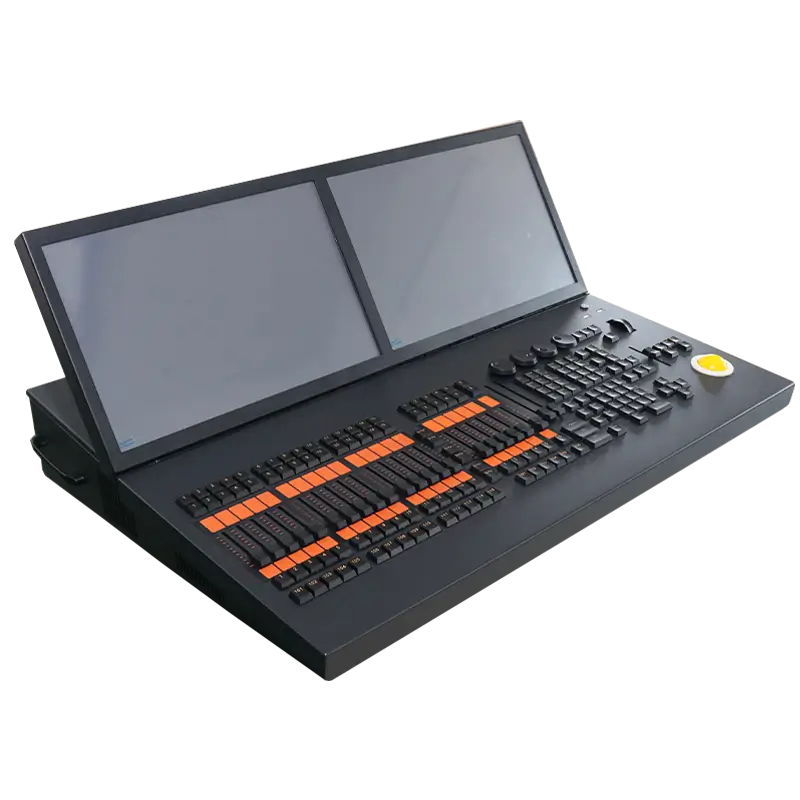
USB wing for PC/laptop (Win 7+ with Titan software). Current version has 1 USB socket. Usually powered by USB. Can use DC power input (9V DC from Avolites) if laptop USB power is insufficient. PE socket for grounding to solve DMX issues if laptop isn't earthed. |
| Playback Faders |
Store and play back cues/chases. Screen bottom shows playback info. |
| Page Select Buttons |
Change playback pages. |
| Attribute Control Wheels |
Set fixture control values, chase speeds and fades. Bottom right of screen shows controlled attribute info. |
| Attribute Select Buttons |
Select fixture attributes (e.g. color, gobo, position) for control wheels. Buttons have lights for active attributes. Control attribute functions like Fan and Shapes. |
| Chase and Cuelist Control Buttons |
Start/stop chases/cuelists and move within the list. |
| Numeric Keypad and Other Control Buttons |
Enter values and change system controls. |
| Function Buttons |
Store cues, copy, save to disk, etc. |
| Workspaces, Macros and Executers Buttons |
Programmable. Store workspaces, button macros or cues. |
| Workspace Window Select Buttons |
Set shown windows on screen. |
| Screen |
Can use touch screen or mouse (click where manual says 'touch'). Four Workspace Windows with touch buttons for fixture, palette, group, shape, attribute selection etc. Visualiser can be in a window. System Menu softkeys top right (select by touch/click or control panel menu buttons). System prompts left of menu keys. Context buttons below for relevant operations. Workspace Buttons for quick workspace screen layout selection. Wheels display shows current 3 - wheel attributes. Attribute status display shows active/modified attributes. Playback information shows legend and details of 10 - fader playbacks. |